Why are keyboards so bad?
What if our parents were right, and it was indeed the fault of them screens? Computers have brought so much joy in my life, but something I did not see coming through the vigor of my youth is risking really avoidable and oddly specific health issues related to them. As I got older, and my desire to optimize almost anything in my life worked its magic, I naturally got interested in custom keyboards.
But I wanted to do it the cool (and poor) way!
There is already a lot of content on the internet about this topic, and anyone stumbling upon it can feel the rabbit hole waiting to be followed. I took the issue pretty seriously, as I’m spending almost all of my awake time behind a computer of some sort since I was 8 years old.
TL;DR, the reasons are the following:
- Prevent injuries
- Comfort
- Customization
The main one for me was injury prevention. I didn’t experience pain firsthand, but I was for sure not waiting for that to happen.
Now if you’ve clicked on this article you want to go at least a bit down the rabbit hole, so here are my findings on the topic.
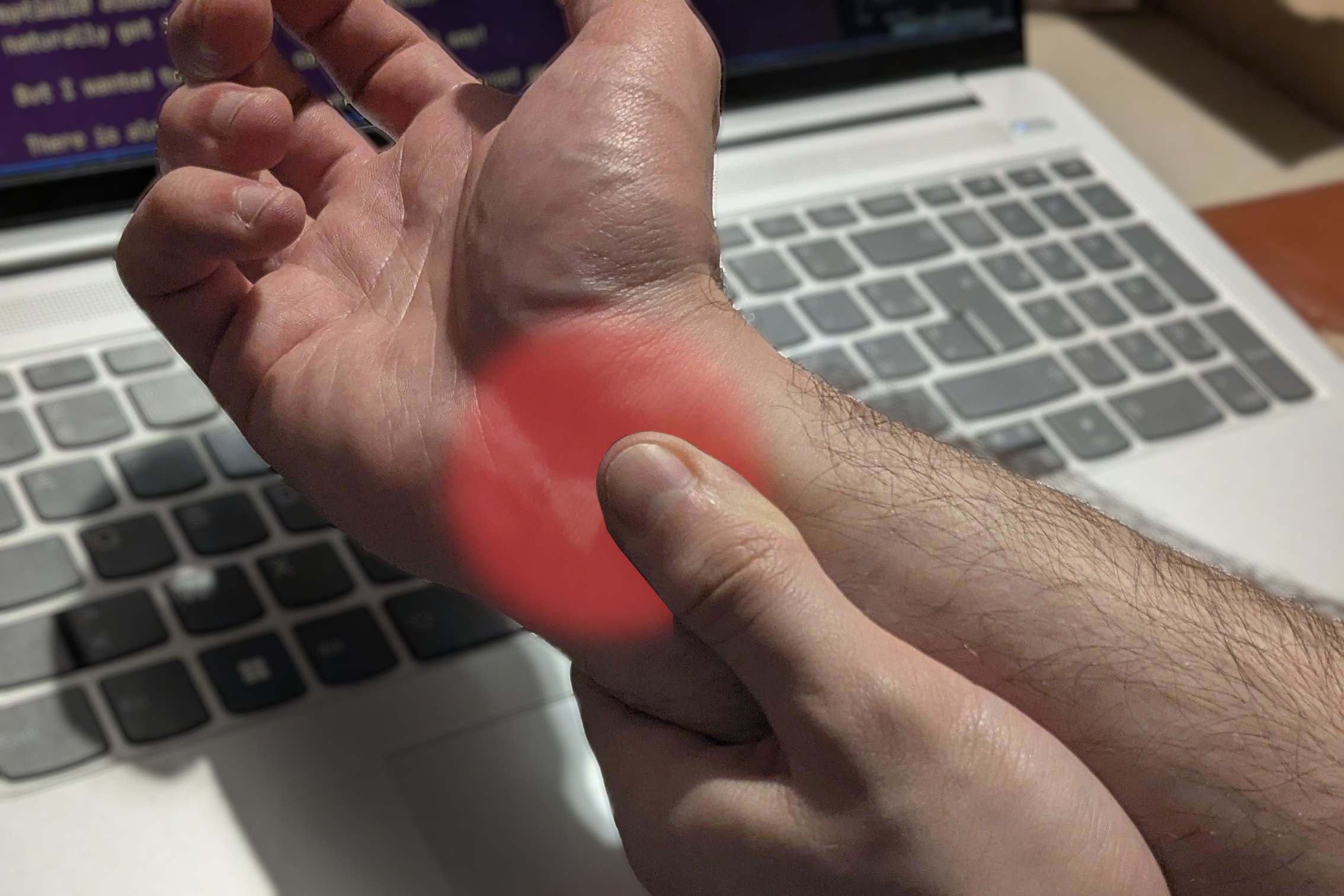
Carpal tunnel
You may have heard about carpal tunnel. I personally never saw anything other than jokes about it so I’m going to explain what I found on the topic. Keep in mind that I’m no doctor and I only cared about the gist of it at the time of research, so that’s what you’re getting.
Basically, carpal tunnel is a passageway for your nerves and tendons through the wrist joint. So its a bit of a chokepoint that passes some important features to a hand: the sense of touch and the ability to move.
The effects of keyboard use on it
If compressed, the space for your tendons and nerves shrink, but they still have to transmit movement and feeling to your fingers. The combination of the two result in grinding the tendons against the inside, and may cause inflammations, known as tendinitis.
That’s basically what happens when we type: we constrict our whole arms so our hands are aligned with whatever our input device is, and we stay like that for extended periods of time while moving our fingers in repetitive motions on the other end.
The issues with keyboard design
You guessed it, heavy keyboard use makes us prone to those types of injuries. A good chunk of that is due to their conception, so I synthesized each design feature with a related constraint on the body.
It’s a horizontal slab -> Palm down
Yeah, hands have to face the keyboard to use it, and a keyboard must rest on a flat desk of some sort. Nothing to complain about here, right?
Well, let’s take a look at an arm in different positions:
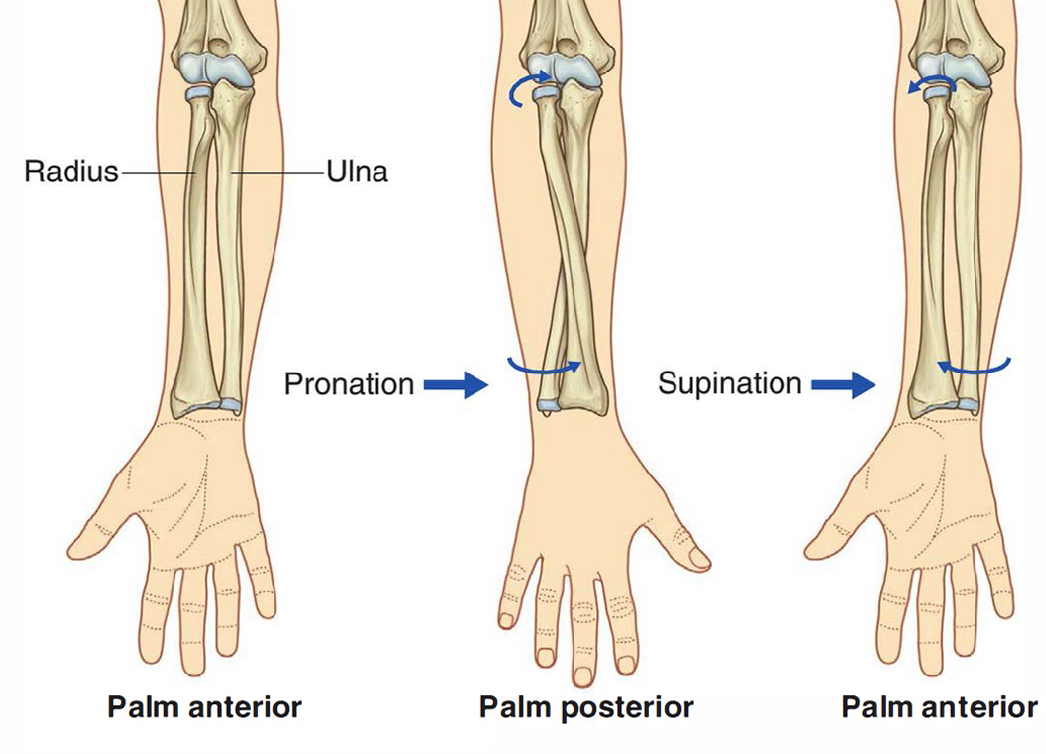 Having the palm down is called pronating, a term you may be familiar with if you workout.
As you can see, the forearm contains two bones. On the second position “Palm Posterior”, they cross. That means that everytime you rest palm down, you constrict your forearm and your wrist, by extension.
Also, depending on your keyboard height, you may have to bend your wrists upwards once in that palm down position, which looks like this:
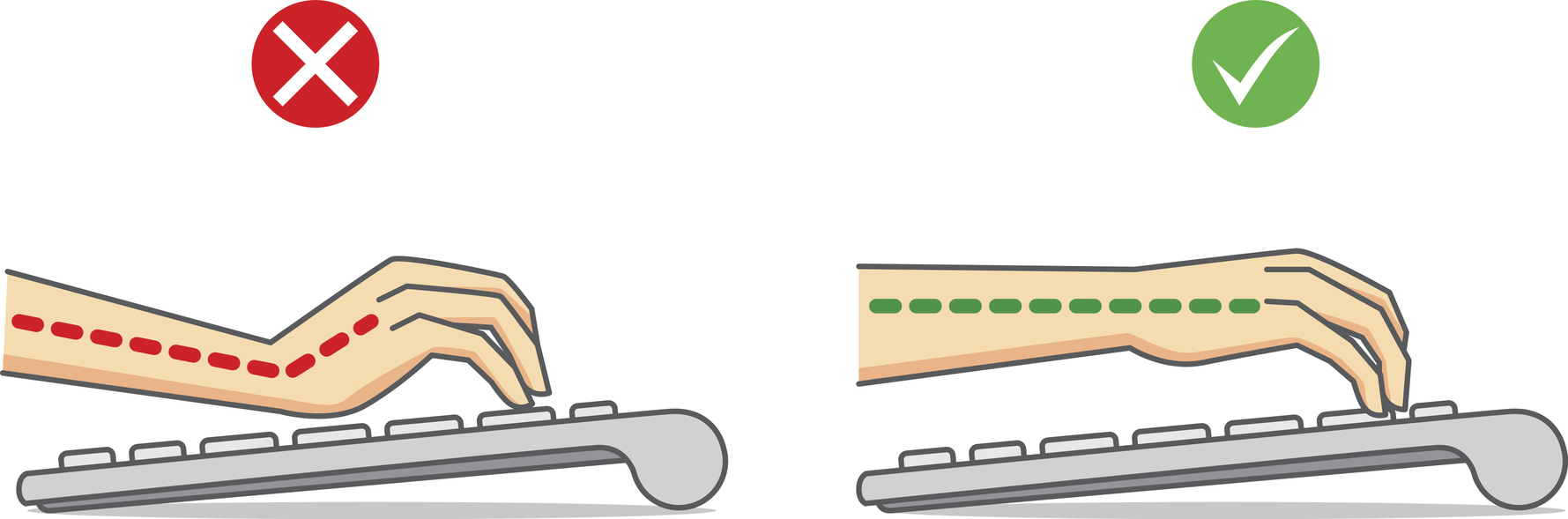
With both of those constrictions combined, you can now add finger movements and you’ve got yourself a recipe for injuries.
It’s a slab narrower than your soulders -> Bent wrists
The natural position of your arms is to rest alongside your body, at shoulder width. What happens when you need to align your hands in front of a keyboard narrower than that length?
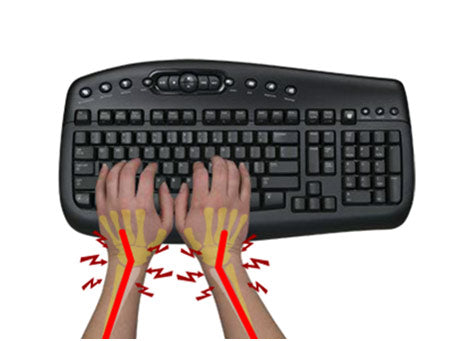
You have to twist them towards your elbow. The forearm bone on that side of the wrist is called the Ulnea, so that’s an ulnar deviation.
Nice, another scientifically named way to squish your wrists while using your fingers! That’s starting to add up.
Staggered rows for straight-moving fingers
Ok, now that we’ve tortured our wrists, how about we add the fingers to the hitlist.
Let’s travel to a time before computers, where we used typewriters.
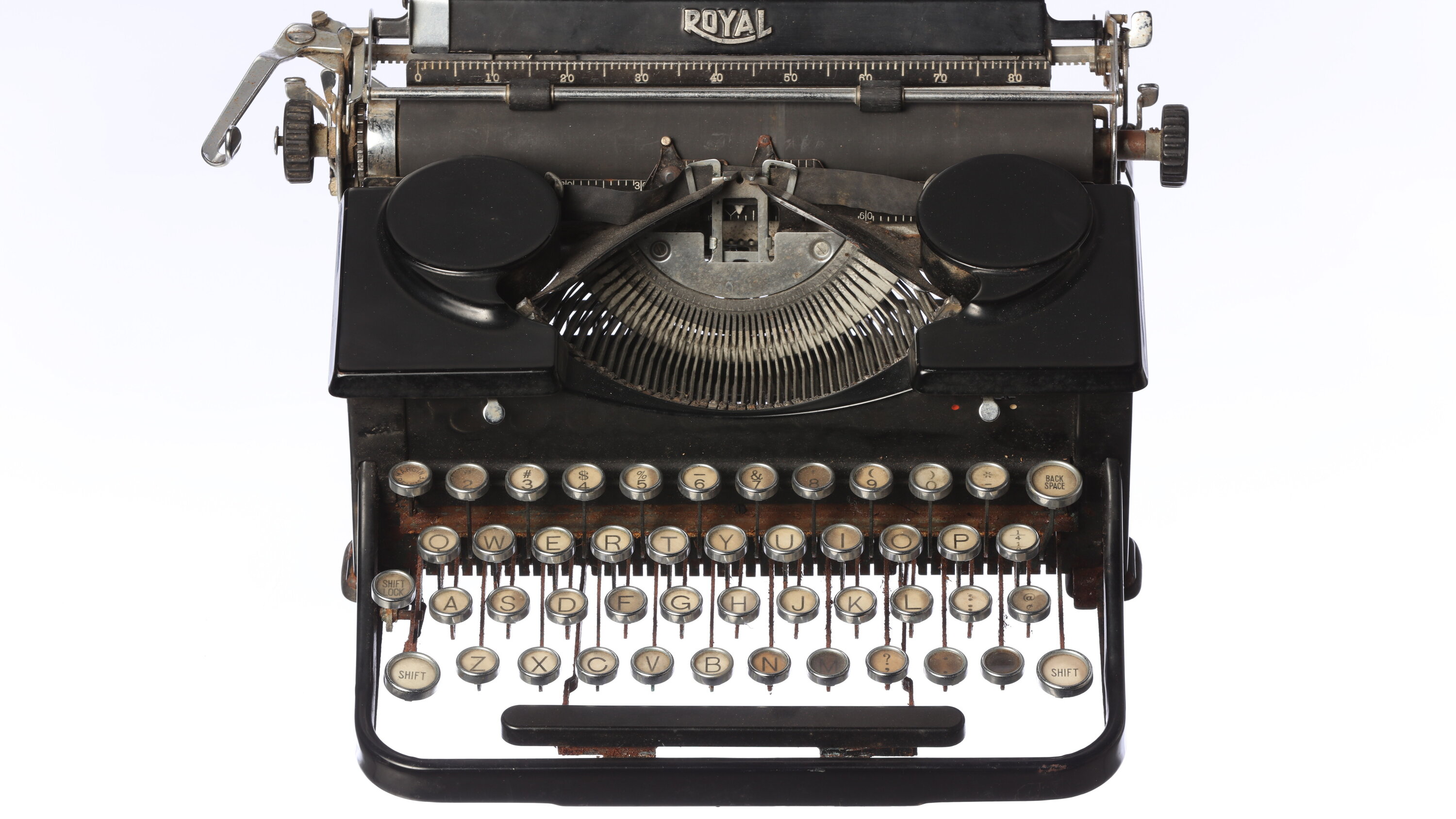 As you can see, there are physical metal rods that must go from the lettered key to the stamp. Because of that, we couldn’t place the keys in straight columns, that’s why they’re staggered.
When computers started to emerge, we needed a directly familiar human interface to input text, so the layout didn’t change one bit. Now that everything travels inside electronics, there’s no reason to keep it like this other than resistance to change.
As you can see, there are physical metal rods that must go from the lettered key to the stamp. Because of that, we couldn’t place the keys in straight columns, that’s why they’re staggered.
When computers started to emerge, we needed a directly familiar human interface to input text, so the layout didn’t change one bit. Now that everything travels inside electronics, there’s no reason to keep it like this other than resistance to change.
However this has several impacts, like increased manufacturing costs and complexity (different size keycaps) and arguably esthetics. As for health, this can either impact your fingers or wrists, everyone has a different way to position to deal with this.
The staggering is to the left side and your fingers extend in a straight line, so your right hand gains reduced ulnar deviation, while the left one has it worse.
Try it: place your hands on the home rows with the index fingers on F and J. Assuming you use QWERTY, press M with your right index, and V with your left index. Notice the difference? V should be less confortable. You either move your index in a weird way, or have increased ulnar deviation to make it move in a straight way.
Another fun side-effect is using the wrong fingers for certain keys, like using the left index for C when it should be the middle finger (as C is under D and D is for your middle finger).
Bad layout
While we’re on about layout let’s address other points that piss me off as they’re pure incoherences only due to inheriting the typewriter layout.
Key use
You know why we have QWERTY? So door-to-door salesmen could flex their typewriter skills by writing “typewriter” really fast. Every letter of this word are on the top row, so inputting the word at impressive speed is only a matter of muscle memory.
But is the layout any good for having commonly used letters as close to the home row as possible?
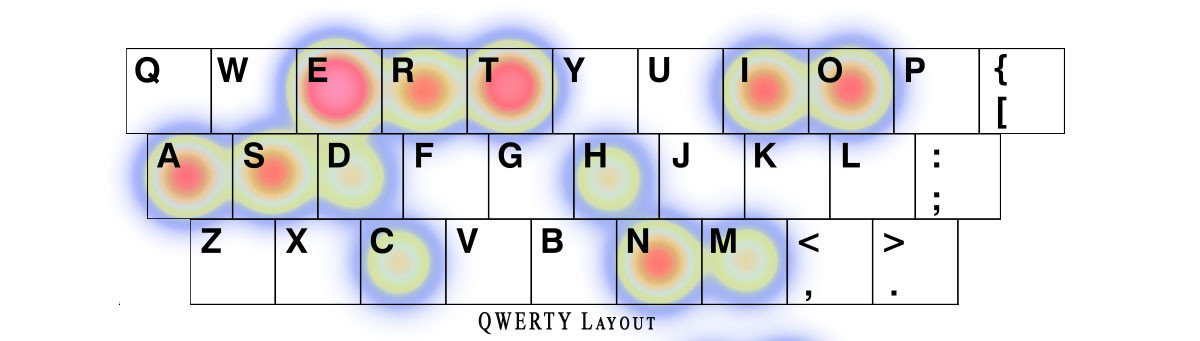 That looks pretty messed up, it’s all over the place! Just having
 E and D for the same finger, and E out of the home row should give and hint to how bad it is. Actually, I found online that QWERTY was designed to slow typing so that people wouldn’t jam their typewriter.
It looks like a good idea to change that layout now that we all use computers, right? Good news, some people have!
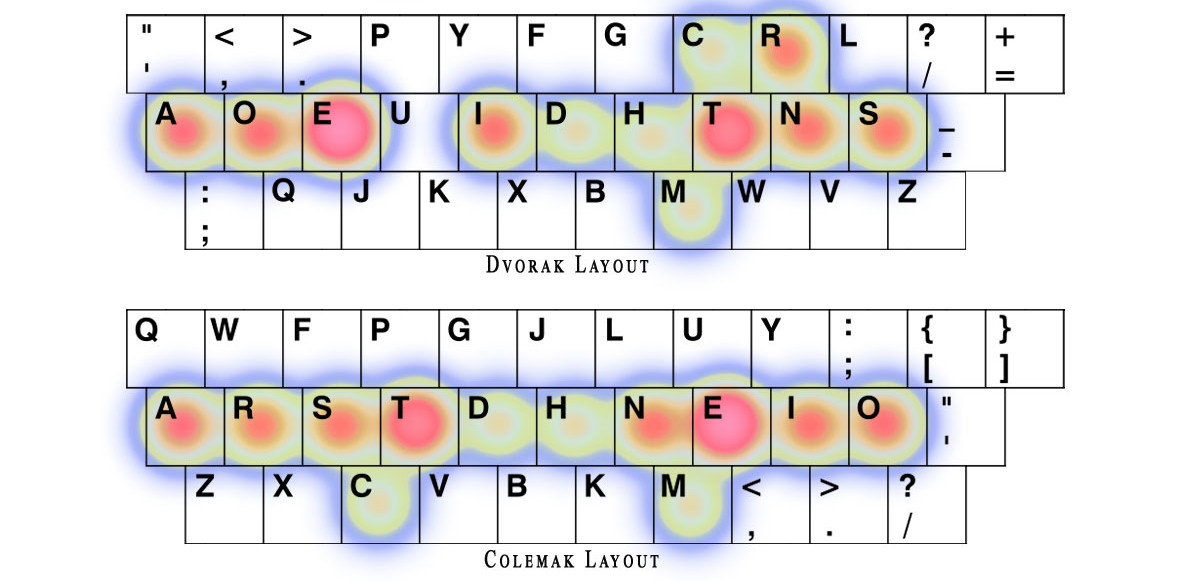 That looks more right.
I hope you can now understand why people going down the rabbit hole would choose to learn a new layout. I mean, if you’re that infuriated by the status-quo already, you might as well give the middle finger to that archaic layout and re-adapt your keyboard to your use-case.
Finger use
Haven’t we sufficiently dunked on the layout? Is there really anymore to say? Oh you thought we would stop at character heatmaps?
What about the other super important keys?
You like to delete your mistakes? Insert line breaks, or confirm your inputs? Why don’t you go waaay right with the weakest finger of your hand?
Oh you wanted easy shortcuts? Let’s destroy your other pinky then, have some of that LCtrl and LShift archeology down there!
Why do we do this to ourselves? Why do we have so much important keys per measly pinky, but one spacebar for two stronk thumbs?
This is probably the one point that infuriates me the most, even when disregarding health concerns completely. The sheer lack of ergonomics this layout inflicts on our hands is baffling to me.
A solution ?
At this point this point the feeling of disgust is immense. So immense that I know you never want to touch a regular keyboard ever again. You feel like you lose yourself, and are ready to do everything with your mouse to save your hands from the filthy QWERTY.
But there is still a faint light that calls you from afar, there is still a solution!
In the next article, I’m going to briefly go over the available solutions on the market, and in depth about the DIY route, which I picked.